Creating Check Sheets gives your employees a way to ensure they have all the items needed to perform their daily task. To configure check sheets follow the steps below.
Step 1: Log into the VAIRKKO Platform
Step 2: Access the Administrative area by clicking 'ADMIN' in the upper right-hand corner.
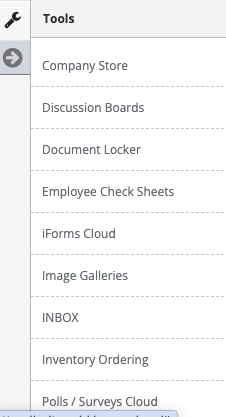
Step 3: Access 'Employee Check Sheets' from the Administrative Toolbar
You will need to complete your Check Sheets in the following order:
- Sheet Template
- Sheet Categories
- Pick List
- Adding Questions
Step 1: Select 'Sheet Templates' from the in-app menu.

Step 2: Select 'Add Sheet' to configure a new sheet.

Step 3: Follow the on-screen prompts to configure your check sheet template.
Working with Configured Check Sheets
Step 1: Select the 'Active Sheets' tab.

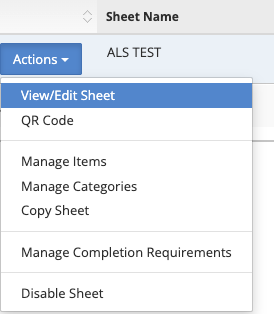
Step 2: Select View/Edit from the actions button to interact with the check sheet template.
Step 3: Make changes to your check sheet template and hit submit to save those changes.
Notification Settings
- Every time this checksheet is created - allows you to send a notification to either one group or a group based on the location
- Only when a critical failure exists - allows you to select a group to receive a notification for each sheet category
Was this article helpful?
That’s Great!
Thank you for your feedback
Sorry! We couldn't be helpful
Thank you for your feedback
Feedback sent
We appreciate your effort and will try to fix the article