To access the schedule launch pad follow the steps below.
Step 1: Log into the VAIRKKO Platform
Step 2: Access the Administrative area by clicking 'ADMIN' in the upper right-hand corner.
Step 3: Access the 'Schedule Management' from the Administrative Toolbar
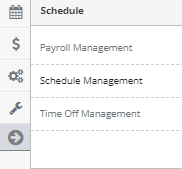
Step 4: From the Launch Pad area you can access the following areas:
- Saved Editor Views - Access your saved schedule views
- Schedule Editors - View the schedule from the selected editor
- Manage External Riders - Review or add third riders to the schedule
- Manage Attendance Events - Add, review, or process attendance events
- Add Schedule Slot - Add an ad-hoc shift to the schedule
- Manage Employee Time Off - Add, review, or process time off request
- Manage Slot Trade/Swaps - Add, view, or process swaps/trades
- Work with Slot Bids - Displays open slots with bids
- Message Crews - Message on-duty crews
- Fill Open Slots From Availability - Displays open slots with availability
- Configure/Setup Schedule - Access the schedule setup or configuration area
- Review Schedule Changes - Schedule history log
Was this article helpful?
That’s Great!
Thank you for your feedback
Sorry! We couldn't be helpful
Thank you for your feedback
Feedback sent
We appreciate your effort and will try to fix the article