To view important details relating to employee time cards prior to running payroll continue reading below.
Step 1: Select 'Time Card Exceptions'
Step 2: Follow the on-screen prompts to view the pay period exceptions

Navigating Pay Period Exceptions
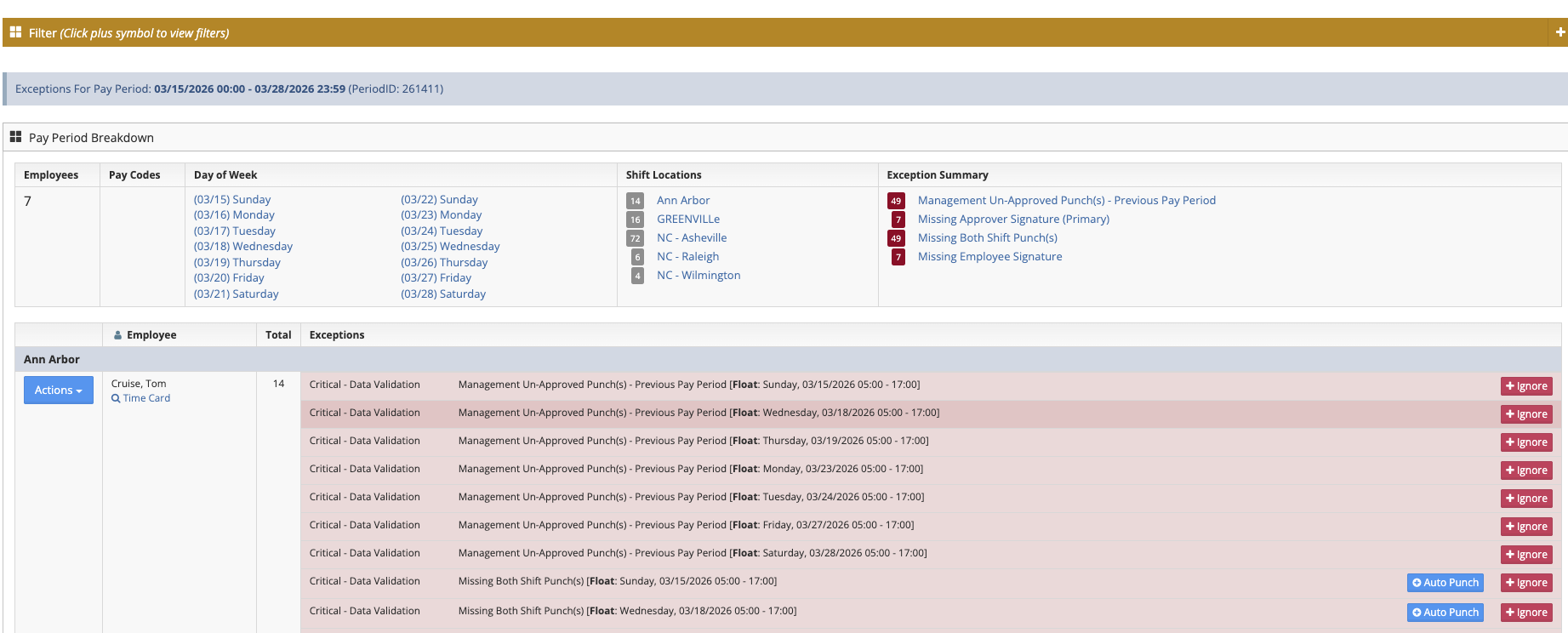
Actions Button - From the Actions Button you can choose to ignore entries for this employee
User - List the employee name and gives the ability to view the employee's time card
Total - The total issues for this employee
Exceptions - List the Urgency and type of exception
+Ignore - Ignores the exception on the line adjacent to the button
+Auto Punch - Punches the employee in and out of the specific shift
Was this article helpful?
That’s Great!
Thank you for your feedback
Sorry! We couldn't be helpful
Thank you for your feedback
Feedback sent
We appreciate your effort and will try to fix the article