To disable an active employee's account or to reactivate a disabled account follow the steps below.
Step 1: Log into the VAIRKKO Platform
Step 2: Access the Administrative area by clicking 'ADMIN' in the upper right-hand corner.
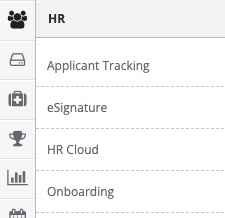
Step 3: Access the 'HR Cloud' from the Administrative Toolbar
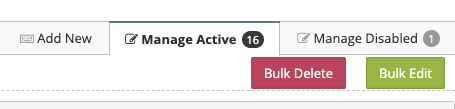
Step 4: Select the 'Manage Active' tab
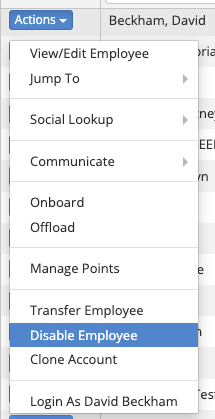
Step 5: Select 'Disable Employee' from the actions button next to the employee
Step 5: Follow the on-screen prompts to disable the employee
Reactivating an account
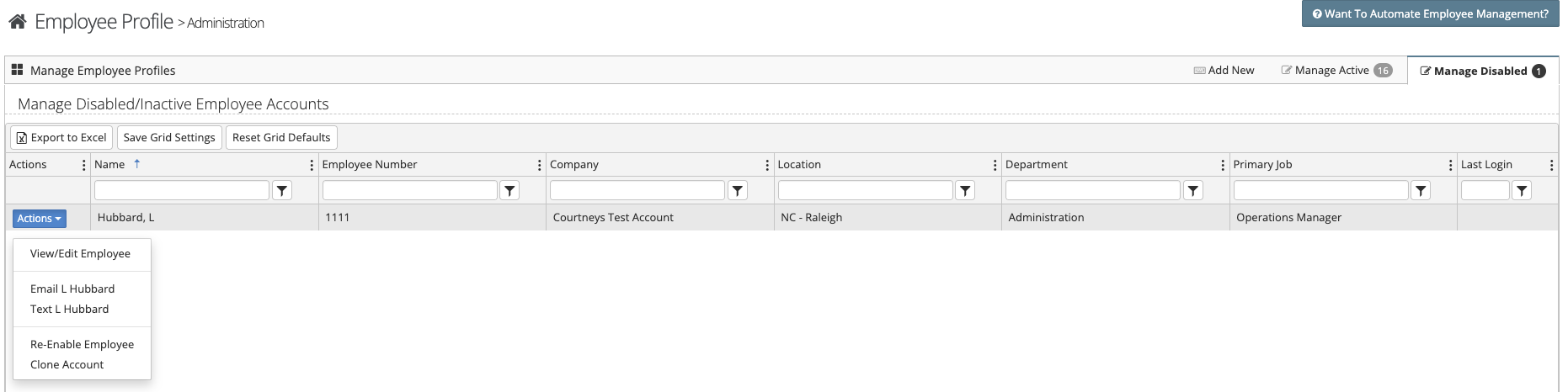
Step 1: Select the 'Manage Disabled' tab
Step 2: From the actions button you can view/edit the account, email or text the employee, re-enable the account, or clone the account
Additional Information:
When an account is re-enabled, the employee's status under the HR tab will remain set to Inactive. You will need to update the status to Active before the employee will be able to log in.
Please also note that any previous group assignments and security rights will not automatically be restored when the account is re-enabled. These settings will need to be reviewed and updated manually as needed.
Was this article helpful?
That’s Great!
Thank you for your feedback
Sorry! We couldn't be helpful
Thank you for your feedback
Feedback sent
We appreciate your effort and will try to fix the article