To search for On-Boarding history or add a new instance follow the steps below.
Step 1: Log into the VAIRKKO Platform.
Step 2: Select 'Admin' in the upper-right hand side of the screen.
Step 3: Access the 'HR CLoud' from the Administrative Toolbar
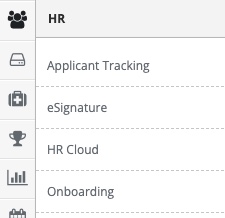
Step 4: Access 'On-Boarding' in the in-app menu.

Step 5: Access 'Instances' in the in-app menu.

Step 6: Select the 'Instance' tab to view the status of currently assigned templates.
Step 7: You can search instances by opening the filter area.
Additional Information
You can add a new instance by selecting the 'Add Instance' tab.
Was this article helpful?
That’s Great!
Thank you for your feedback
Sorry! We couldn't be helpful
Thank you for your feedback
Feedback sent
We appreciate your effort and will try to fix the article