You can view, edit, and manage all previously created courses within the Classroom (ILE) Training Cloud.
Navigation Path
Admin > Classroom (ILE) Training Cloud > Courses > Existing
Instructions
Step 1: Log into VAIRKKO
Log into the VAIRKKO platform using your credentials.
Step 2: Access the Admin Area
Click “ADMIN” in the upper right-hand corner of the screen.
Step 3: Open Classroom (ILE) Training Cloud
From the administrative toolbar, select Classroom (ILE) Training Cloud.
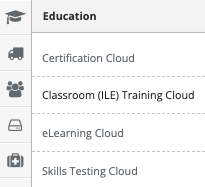
Step 4: Navigate to Courses
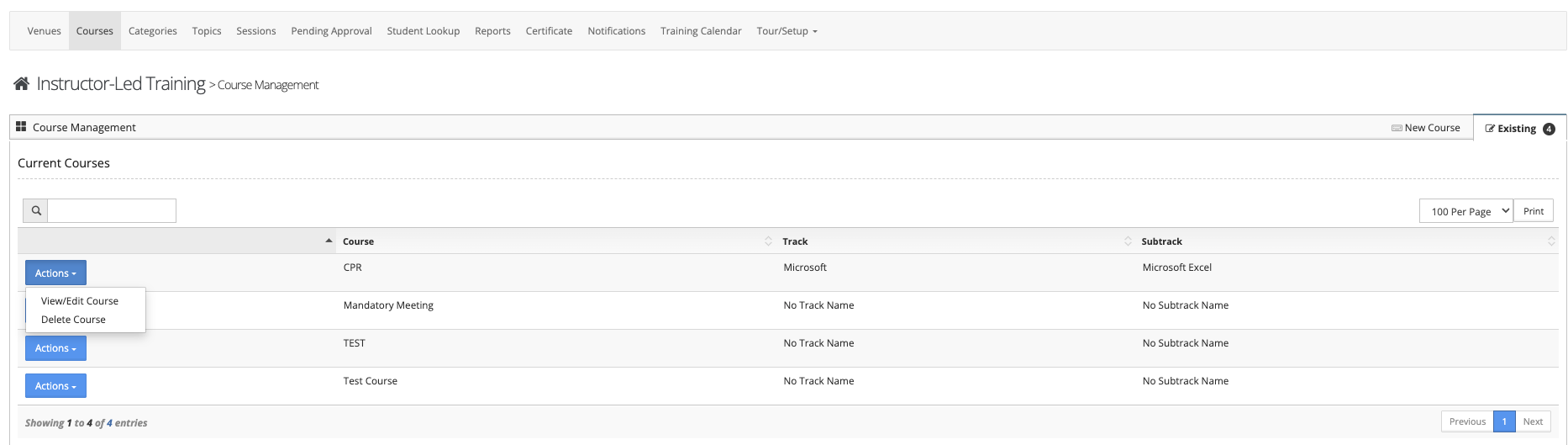
Select “Courses” from the in-app menu.
Step 5: View Existing Courses
Click the “Existing” tab to view all courses that have already been configured.
Step 6: Manage Course Settings
Click the “Actions” button next to the course you wish to manage. From here, you can:
- Edit course details
- Delete the course
Notes
- Changes to a course may impact associated sessions.
- Deleting a course may remove access to related training records.
- Ensure updates are reviewed before saving changes.
Was this article helpful?
That’s Great!
Thank you for your feedback
Sorry! We couldn't be helpful
Thank you for your feedback
Feedback sent
We appreciate your effort and will try to fix the article