To create shift groups follow the steps below.
Step 1: Log into the VAIRKKO Platform
Step 2: Access the Administrative area by clicking 'ADMIN' in the upper right-hand corner.
Step 3: Access the 'Schedule Setup' from the Administrative Toolbar
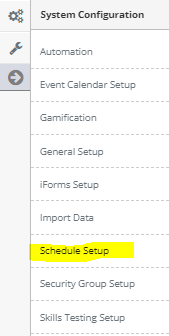
Step 4: 'Configuration' from the in-app menu

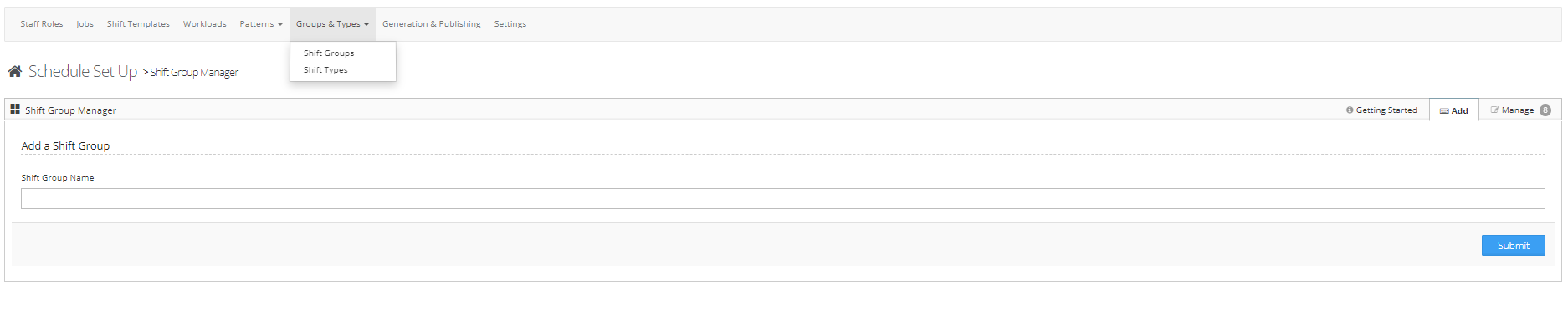
Step 5: Select 'Shift Groups' located under the Group & Types header in the in-app menu

Step 6: Select the 'Add' tab to enter a new shift group. To edit or manage a shift group select the 'Manage' tab
What is a shift group?
Creating Groups allows your agency to have numerous shifts assigned to one Job. Having this feature eases the amount of time you have to spend duplicating efforts to configure your schedule. Having a job titled “Special Event”lets you have a Job to cover your special events. By adding individual Groups such as “Inside Crew” will allow you to Link multiple crews to this one Job.